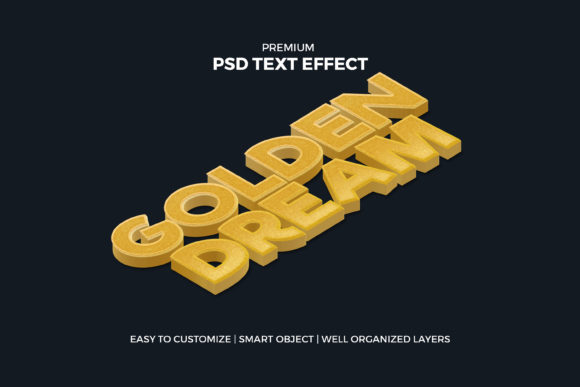
Isometric 3d Gold Text Effect
Creating professional-looking graphics often feels like a steep learning curve, especially when you are trying to achieve that specific blend of modern geometry and luxurious texture. The Isometric 3d Gold Text Effect is a premium Photoshop template designed to bridge the gap between complex 3D rendering and simple drag-and-drop usability. For creators ranging from social media managers to small business owners, this tool offers a shortcut to high-end visuals without requiring mastery of advanced 3D modeling software.
However, simply downloading a template does not guarantee a polished result. Many users overlook critical details regarding resolution, layer organization, and application context, leading to pixelated outputs or designs that feel out of place. Understanding how to leverage this effect correctly ensures your final product looks expensive, intentional, and sharp across all platforms.
Understanding the Isometric Aesthetic
The term "isometric" refers to a method of graphical representation in which three-dimensional objects are drawn so that all three axes appear equally foreshortened. Unlike perspective drawing, where lines converge at a vanishing point, isometric drawings maintain parallel lines. This creates a clean, technical, yet playful look that has become incredibly popular in digital marketing, app icons, and modern web design.
When combined with a gold texture, the effect adds a layer of prestige and warmth. It transforms flat typography into something tangible. The Isometric 3d Gold Text Effect template automates the heavy lifting involved in creating these angles and applying realistic lighting, shadows, and metallic gradients. Instead of manually adjusting hundreds of points to get the reflection right on a letter 'A', the template handles the geometry, allowing you to focus on the message.
Common Pitfalls in Usage
While the promise of "easy to use" is accurate for those who know Photoshop basics, several common mistakes can ruin the potential of this template. Recognizing these issues beforehand will save you time and frustration.
Ignoring Resolution Requirements
One of the most frequent errors is assuming that a standard screen resolution is sufficient for all uses. While the template is described as high-resolution, the output quality depends heavily on your canvas settings. If you plan to use the text effect on a large format poster or a billboard, designing at 72 DPI (dots per inch) will result in jagged, blurry edges. Always ensure your working document is set to 300 DPI for print materials. For web-based work like Facebook covers or Instagram posts, 72 to 150 DPI is typically acceptable, but higher resolutions provide better scalability if you need to crop or zoom later.
Neglecting Layer Organization
Premium templates usually come with organized layers, but beginners often flatten the image too early or delete placeholder groups before understanding their function. The Isometric Gold Text Effect relies on specific layer styles—such as drop shadows, inner glows, and gradient overlays—to create depth. If you merge these layers prematurely, you lose the ability to tweak the intensity of the shadow or change the color of the gold without starting over. Keep the smart object structure intact until you are ready to export the final file.
Mismatched Lighting Contexts
A gold text effect has a specific light source direction baked into its shadows and highlights. If you place this text onto a background that has conflicting lighting, the result will look artificial. For example, if your background suggests light coming from the top left, but your isometric text casts shadows to the bottom right, the eye will detect an inconsistency. This subtle disconnect can make a design look amateurish. Always adjust the angle of the drop shadow within the template to match the ambient light of your background image.
Strategic Applications Across Platforms
The versatility of this template lies in its adaptability. Because it is vector-friendly or high-res raster-based, it scales well across different mediums. Here is how to apply it effectively in various contexts:
- Social Media Graphics: Use this effect for Facebook covers or Twitter headers to grab attention in a crowded feed. The 3D nature breaks the monotony of flat colors. However, avoid placing too much text; let the golden letters be the hero. Ensure the text remains legible against the background by adding a subtle dark overlay behind the text if necessary.
- Instagram Posts: For promotional posts, such as a sale announcement or a new product launch, the gold effect conveys value. Pair it with minimalist backgrounds to let the text pop. Remember that Instagram compresses images, so exporting in PNG format rather than JPEG helps preserve the sharpness of the edges.
- Apparel and Merchandise: When designing T-shirts or hoodies, the isometric style works well because it translates cleanly to screen printing or embroidery. The geometric lines hold up better at smaller sizes than intricate, thin fonts. Check the contrast ratio between the gold and the fabric color. Gold on white can sometimes lack definition; consider using a darker shade of gold or adding a black stroke outline for better visibility.
- Print Materials: Flyers and posters benefit from the tactile feel of gold. In print, you can even simulate foil stamping effects by converting the gold layer to a spot color if your printer supports it. This elevates the perceived value of the flyer significantly.
Evaluating Before You Download
Before committing to any premium template, including the Isometric 3d Gold Text Effect, take a moment to evaluate its compatibility with your workflow. Not all Photoshop files are created equal.
First, check the version compatibility. Ensure the template is compatible with your version of Adobe Photoshop. Newer features may not render correctly in older versions, leading to errors. Second, review the included assets. Does the package include sample fonts? If not, do you own the required typefaces? Missing fonts can cause layout shifts that break the isometric alignment. Third, look for customization guides. A good template will either have a README file or clear labels indicating where to type your text and where to swap out textures.
Maximizing Customization
The true power of this template lies in its ease of customization. You are not stuck with a single shade of yellow-brown. Experiment with different gold tones. Try rose gold for a softer, more feminine aesthetic, or use a champagne gold for a sophisticated, understated look. You can also modify the bevel and emboss settings to make the text appear more metallic or more matte, depending on the mood of your project.
Furthermore, play with the spacing. Isometric text often benefits from slightly wider tracking (letter spacing) to enhance readability and emphasize the geometric structure. Tight letters can clutter the visual hierarchy, while wide spacing allows the 3D form to breathe.
Final Thoughts on Efficiency
Using a premium template like the Isometric 3d Gold Text Effect is an investment in efficiency. It removes the barrier of entry for complex 3D design, allowing marketers and creators to produce stunning visuals quickly. By avoiding common pitfalls related to resolution, layer management, and lighting consistency, you ensure that your designs remain professional and impactful. Whether you are crafting a social media campaign or designing merchandise, this tool provides a reliable foundation for success. Focus on the content and the message, and let the template handle the heavy lifting of visual appeal.